so i've been using zeus chronicles for a few weeks now and tbh it's grown on me more than i expected... like i downloaded it mostly because i kept getting confused about whether my kitchen appliances were overloading the circuit, and the load calculator actually helps with that in a …
Zeus Chronicles App
3.00 (3 reviews)On this page
Reviewed by
Ludis.app Team
Published
May 19, 2026
Updated
May 19, 2026
Zeus Chronicles is a home electrical management app designed for anyone who wants a clearer picture of what's happening with the power in their home. It brings together diagnostic, calculation, and tracking tools in one dark-themed, icon-driven interface. The app is built for everyday homeowners, renters, and anyone curious about their energy use — no electrician's license required. Last updated April 29, 2026.
Inside the App
What the App Does
Zeus Chronicles covers the full range of residential electrical concerns, from spotting warning signs to understanding exactly how much power your appliances are drawing. The Problem Detector walks users through common symptoms — flickering lights, overheating outlets, tripped circuit breakers, strange noises — and returns a diagnosis with a labeled risk level (such as "Medium Risk"), a recommended action, and practical tips. It tells you clearly whether something is a DIY fix or a situation that calls for a licensed electrician.
Calculating Load and Tracking Consumption
The Load Calculator lets you build a list of household appliances — organized by category, starting with the kitchen — and configure each one with a power setting and daily runtime. Appliances like an electric kettle (1500W–2200W), microwave oven (700W–1200W), refrigerator (100W–300W), and freezer (100W–250W) are available as templates. The result is a Load Analysis screen showing total wattage, current draw at your supply voltage, outlet safety status, and a recommended breaker size. The Consumption Calculator goes further, producing a monthly report that breaks down usage by appliance with percentage bars and a total cost in USD, including a budget tracking line showing how much remains.
- Meter Readings tracker for monitoring usage over time directly in the app
- Activity dashboard showing totals for calculations, kWh, cost, and appliances across week, month, or all-time views
- Knowledge Base covering electrical safety concepts
Where the Name Comes From
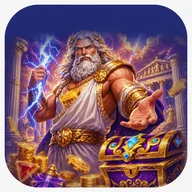
The app's branding leans hard into Greek mythology. Promotional screens feature a Zeus figure — long white-and-blonde hair, golden armor, blue lightning crackling from his palm — set against purple stormy skies and classical columns. Ornate golden symbols including chalices with Greek key borders and an hourglass with red sand appear in a slot-machine-style visual layout, with multiplier values like 2.8x and 3.5x displayed on screen. It's a striking aesthetic, and the lightning bolt motif carries through into the functional UI, appearing on navigation cards, section headers, and the main Calculate Load button.
Accessibility Gaps Worth Noting
The app has a solid foundation — large touch targets, clear text labels, and a well-structured navigation grid — but it carries some real accessibility limitations. Status indicators like "Safe" or warning states rely entirely on color with no supplementary text or icon differentiation. Slider controls for power and runtime do not announce their current values to screen readers, and the close buttons on appliance cards are notably small, which can be a problem for users with motor impairments. Progress bars lack textual percentage readouts.
The functional side of Zeus Chronicles is genuinely useful, but the decorative gaming imagery and color-only status coding suggest the accessibility work hasn't kept pace with the visual ambition.
App Technical Details
Developer
Bright Vault Entertainment Limited
Last Updated
Apr 29, 2026
Main Modules
6 sections: Problem Detector, Load Calculator, Consumption Calculator, Meter Readings, Knowledge Base, Settings
Appliance Templates
Searchable, categorized library with per-appliance wattage ranges (e.g., Electric Kettle 1500W–2200W, Microwave Oven 700W–1200W, Refrigerator 100W–300W, Freezer 100W–250W)
Load Analysis Output
Total load in watts, current draw in amperes at operating voltage (e.g., 220V), outlet safety status, and recommended circuit breaker size
Consumption Report
Monthly kWh total, USD cost estimate, per-appliance percentage breakdown, and budget tracking with remaining balance
Problem Detector
Classifies issues by risk level (e.g., Medium Risk); covers flickering lights, overheating outlets, tripped circuit breakers, and strange noises; provides recommended actions and safety tips
Activity Tracking Filters
Calculations history filterable by Week, Month, or All time; tracks consumption (kWh), load (W/100), and cost (USD)
| Developer | Bright Vault Entertainment Limited |
| Last Updated | Apr 29, 2026 |
| Main Modules | 6 sections: Problem Detector, Load Calculator, Consumption Calculator, Meter Readings, Knowledge Base, Settings |
| Appliance Templates | Searchable, categorized library with per-appliance wattage ranges (e.g., Electric Kettle 1500W–2200W, Microwave Oven 700W–1200W, Refrigerator 100W–300W, Freezer 100W–250W) |
| Load Analysis Output | Total load in watts, current draw in amperes at operating voltage (e.g., 220V), outlet safety status, and recommended circuit breaker size |
| Consumption Report | Monthly kWh total, USD cost estimate, per-appliance percentage breakdown, and budget tracking with remaining balance |
| Problem Detector | Classifies issues by risk level (e.g., Medium Risk); covers flickering lights, overheating outlets, tripped circuit breakers, and strange noises; provides recommended actions and safety tips |
| Activity Tracking Filters | Calculations history filterable by Week, Month, or All time; tracks consumption (kWh), load (W/100), and cost (USD) |
Zeus Chronicles Explained
What kinds of electrical problems can the Problem Detector identify?
The Problem Detector helps you identify common home electrical issues such as flickering lights, overheating outlets, tripped circuit breakers, and strange noises. For each detected issue, the app provides tips and recommendations, including risk level indicators like Medium Risk and specific suggested actions.
How do I use the Load Calculator to check my home's electrical load?
Open the Load Calculator, browse the categorized appliance list, and add items such as a refrigerator, microwave, or electric kettle to your configuration. Set each appliance's wattage and daily runtime using the sliders, then tap the Calculate Load button to see your total load in watts, current amperage, outlet safety status, and recommended breaker size.
Does the app tell me when I need to call a licensed electrician?
Yes — after diagnosing an issue, the Problem Detector assigns a risk level and clearly states the recommended action, which may include a directive to call a licensed electrician when the problem is beyond safe DIY resolution. This helps you distinguish between issues you can handle yourself and those that require professional attention.
Can I track my monthly energy costs and see which appliances use the most electricity?
Yes, the Consumption Calculator generates a Consumption Report that shows your monthly total in kWh and estimated cost in USD, along with a per-appliance breakdown displaying each item's share of total consumption as a percentage. The report also indicates whether you are within your set budget and how much remains.
What is the Meter Readings feature used for?
The Meter Readings section lets you log and track your electricity meter readings directly in the app, giving you a convenient way to monitor your ongoing electricity usage over time without relying on external tools.
Reviews (3)
View allLog in to write a review
Log in with Telegram
Zeus Chronicles klingt nach einem Abenteuer-Spiel, ist aber in Wirklichkeit eine Haushaltsstrom-App — das muss man erst einmal verdauen. Ob das ein cleveres Rebranding ist oder einfach verwirrend, darüber lässt sich streiten. Was die App tatsächlich liefert: ein Lastenrechner für Haushaltsgeräte, ein Problemdetektor für typische Elektrikprobleme (flackernde Lichter, überhitzte Steckdosen, …
Spent a couple of evenings genuinely poking at Zeus Chronicles, trying to figure out whether it actually delivers on what it promises — and I think the answer is somewhere between 'mostly yes' and 'it depends how patient you are.' The core pitch is reasonable: a utility app that helps …