Tower Rush 2 puts one mechanic at the center of everything: a crane swings a building segment down from above, and you tap to drop it onto the structure below. Land it cleanly and the tower grows. Misjudge the placement and the whole thing can wobble — or collapse entirely. There are no shortcuts and no safety nets. Every floor you add is a small act of commitment.
How the pressure builds
The game starts at a manageable pace, but the challenge escalates with each new level. As the tower climbs higher, the margin for error shrinks. A slight overhang that seemed harmless at floor two becomes a serious problem by floor five. The structure doesn't forgive accumulating mistakes — tension compounds across floors rather than resetting between them. That slow build of stakes is what keeps individual runs feeling meaningful rather than routine.
What you're actually looking at
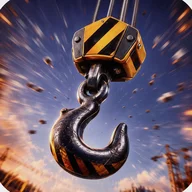
The visual presentation leans into a warm construction-site atmosphere. Building segments are rendered as hexagonal wooden blocks with detailed wood-grain textures, circular windows dressed with blue curtains and red ribbon ties, and doors fitted with metal handles and keyholes. The crane above uses a black industrial hook attached by twisted cables to a yellow-and-black striped warning block — the kind of detail that gives the world a grounded, tactile feel. The backdrop is a purple evening sky behind an urban street scene: a gray modern building on the left, a traditional red-brick multi-story on the right, wooden fencing, street lamps, and a paved road marked with yellow hazard stripes. Golden coins with lightning bolt symbols float through the promotional screens, catching light with a metallic glow.
A note on accessibility
Tower Rush 2 relies heavily on color coding across its interface — yellow-and-black hazard stripes for multiplier displays, green for safety indicators, golden yellow for coin values. Players with color vision deficiencies may find some of these distinctions difficult to parse, and certain text elements on colorful backgrounds can fall short of comfortable contrast levels. The settings screen is minimal, offering only a single Reset option that clears coins and best run data.
The game's real hook is the quiet dread of a tower that's almost straight — that single floor you know is slightly off, and the question of whether it will hold.
The feel of each decision
- Crane descends from the top of the screen, cables extending into view
- Each building segment is unique — window treatments, door styles, and decorative details vary floor to floor
- The street-scene backdrop stays consistent across gameplay, grounding each run in the same neighbourhood
- Progress is tracked visually through floor count and the growing height of the stacked structure
- A reset option in settings lets you clear your run and start clean