Bowling, Plinko, ou tutoriel sur la construction d'avions. L'appli semble ne pas avoir décidé ce qu'elle est. On navigue entre une balle qui rebondit sur des chevilles, des sections censées parler de quilles mais qui expliquent l'aviation, et un profil utilisateur avec des succès à débloquer. Quel est le fil …
Plin-ko Bowl App
2.33 (3 reviews)On this page
Reviewed by
Ludis.app Team
Published
May 28, 2026
Updated
May 28, 2026
Plin-ko Bowl is a mobile arcade game built around a Plinko-style ball-dropping board, layered with multiplier mechanics, an achievements system, and vibrant visual effects. It sits at an unusual crossroads — part casual arcade title, part bowling-themed companion — available on both iOS and Android. The app includes a profile system with level progression, ball customization, and an educational tutorial section alongside its core gameplay. Touch-based controls keep the interaction simple, letting the chaos of the bouncing ball do the heavy lifting.
App Screens
Inside the App
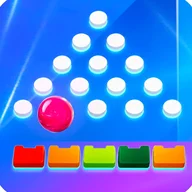
At its core, Plin-ko Bowl presents a vertical game board filled with rows of white circular pegs arranged in a triangular formation — up to around 30 pegs spread across six rows, depending on the screen. A glossy red ball drops from the top and ricochets unpredictably down through the grid, eventually landing in one of the colored multiplier zones that line the bottom of the screen. Those zones carry values ranging from x0.3 all the way up to x75, color-coded in red, orange, green, and yellow. A win display reads "Win 50.00 FUN," and the control panel below the board lets players toggle between manual and auto betting modes, set the number of rounds up to 10, and select line counts from 9 through 16.
Visual Energy and Game Feel
The presentation leans hard into spectacle. The blue gradient background pulses with light ray effects and sparkle particles, while active gameplay screens show multiple balls in play simultaneously, each trailing pink and white particle bursts as they collide with pegs. Pegs light up with blue glow effects on impact. Golden coins with dollar signs float across the screen as animated reward indicators. A dotted white trajectory line appears during certain screens to help predict ball movement — a small but useful strategic tool. The large yellow PLINKO text with its 3D orange outline appears during active rounds, keeping the branding front and center.
Beyond the Board
Outside the gameplay loop, Plin-ko Bowl includes a profile section where users track level progress (shown as a bar with an x320/x400-style counter), customize a nickname and avatar, and work through an achievements list. Achievements range from "First app launch" to "Open the app 4 days in a row," each tied to in-game rewards like x20 bonuses. A ball customization section features named entries like Nebula Strike — a purple ball with a polished cover type and 14 lb weight spec, displayed against a blue starry background. The five-tab navigation bar covers Gallery, My Log, Home, Tasks, and Profile.
Worth Knowing
The app's identity is genuinely mixed. It positions itself as a Plinko arcade game, carries bowling ball imagery and naming throughout, and includes a tutorial section labeled "Types of Bowling Balls" — but that tutorial's actual text content describes aircraft construction materials and manufacturing processes, clearly unrelated placeholder copy. This thematic confusion between Plinko gameplay, bowling aesthetics, and unrelated educational content is the most significant issue the app currently carries. The multiplier system also relies heavily on color coding, which may present challenges for users with color vision deficiencies, though the text values on each zone do provide a non-color fallback.
The visual language here — a glowing ball threading its way through a field of pegs toward color-coded reward zones — is immediately legible as arcade entertainment, even when the content surrounding it pulls in three different directions at once.
Game Technical Details
Platform
iOS and Android
Primary Interaction
Touch-based tap controls
Play Modes
Manual and Auto
Selectable Lines
9 to 16
Multiplier Range
x0.3 to x75
Navigation Tabs
5 (Gallery, My Log, Home, Tasks, Profile)
Developer
Tess wald game
Last Updated
May 14, 2026
| Platform | iOS and Android |
| Primary Interaction | Touch-based tap controls |
| Play Modes | Manual and Auto |
| Selectable Lines | 9 to 16 |
| Multiplier Range | x0.3 to x75 |
| Navigation Tabs | 5 (Gallery, My Log, Home, Tasks, Profile) |
| Developer | Tess wald game |
| Last Updated | May 14, 2026 |
Plin-ko Bowl Help
How do the multiplier zones work in Plin-ko Bowl?
Multiplier zones are colored rectangular areas at the bottom of the board where the ball lands, each displaying a different value — ranging from x0.3 up to x75. Every zone is clearly labeled with white text, so you can identify each value regardless of its color. The zone the ball reaches at the end of its drop determines the multiplier applied to your result.
Can the game play rounds automatically without me tapping each time?
Yes, Plin-ko Bowl offers both Manual (M) and Auto (A) play modes accessible from the control area at the bottom of the screen. In Auto mode, you can also set a specific number of rounds — for example, 10 — so the game runs continuously without requiring a tap for each individual drop.
Is there a way to see where the ball will go before it drops?
Yes, the game displays a white dotted trajectory line on the board that serves as a visual aid to help you predict the ball's path before it completes its drop. This feature is available on the game board and is described as an important tool for gameplay strategy.
How does the achievements system work and what rewards can I earn?
The achievements section is found in your Profile and is organized by level — starting with Level 1: Beginner. Achievements include tasks such as launching the app for the first time, reading cards, creating tasks, and opening the app several days in a row, with rewards displayed as multipliers like x20. Completed achievements are marked accordingly, while locked ones become available as you progress.
Can I customize my profile, and is there a way to start over if needed?
Yes, the Profile screen includes buttons to edit your nickname and profile photo. There is also a dedicated 'Reset Progress' button if you want to clear your progress and start the game from the beginning.
Reviews (3)
View allLog in to write a review
Log in with Telegram
App is a mess. Claims to be a bowling knowledge tool. Actually a Plinko game. Tutorial section has text about aircraft construction — not bowling, not Plinko. Someone shipped placeholder content and never fixed it. Navigation tabs say Gallery, My Log, Tasks. None of that fits a bowling or Plinko …
Pues mira, la descargué porque pensé que era una app para aprender sobre bolos 🎳 (mi marido lleva meses queriendo empezar a jugar con los niños y buscábamos algo así), y la verdad es que al abrirla me encontré con algo bastante diferente a lo que esperaba. Es básicamente un …