Uygulamayı indirdim, antrenman takibi falan güzel görünüyor... ama bir sorun yaşadım, destek hattına yazmaya çalıştım. HİÇ cevap yok. Günler geçiyor, sesizlik. Oturum kaydederken uygulama dondu, veriler gitmedi. Tamam, bug olabilir... ama bunu bildirmek için bir yer bile bulmak ZAMAN ALIYOR. Arayüz hoş, buz teması falan güzel yapılmış. İstatistik ekranı da …
FrostTrack: Skating sessions App
3.00 (2 reviews)On this page
Reviewed by
Ludis.app Team
Published
May 16, 2026
Updated
May 16, 2026
FrostTrack: Skating sessions is a mobile tracking app built specifically for ice skaters who want to take a more structured approach to their time on the ice. It covers the full arc of a training life — logging sessions, watching numbers grow, and chasing goals that actually mean something. The app suits everyone from first-time skaters finding their edges to seasoned athletes drilling triple axels. Inside, you'll find a winter-themed interface that feels at home in the frozen world it's built to support.
App Screens
What's Inside
FrostTrack sits at the intersection of a training journal and a performance dashboard. Every session gets logged with fields for sport type, duration in minutes, and intensity level — rated visually with lightning bolt symbols. You can record the surface type (indoor, outdoor, synthetic, or rental ice) and even name the specific rink or arena. A built-in timer lets you track time live and apply it directly to the session duration, which removes the guesswork from manual entry.
Statistics that go beyond a simple count
The Statistics section is where the app earns its depth. A four-quadrant dashboard shows total sessions, total minutes on ice, number of elements logged, and an overall success rate across those elements. A month-over-month comparison panel lets you stack the current month against the previous one across all three core metrics. Dig deeper and you reach a calendar grid marking active training days, a bar chart breaking down activity by day of the week, and a ranked list of top elements with individual success rates — Axel at 70%, Biellmann Spin at 62%, and so on. All of this can be filtered by surface type at any time.
Goals with deadlines and targets
The Goals screen stores structured skating objectives, each with a title, an optional description, a deadline date, and a specific target element. Example entries in the app include "Master Triple Axel" with a target of Axel (Triple) and a deadline of July 2026. An Add Goal button keeps the list growing. Session templates are also available — you can save a current session configuration and reuse it, which speeds up logging for recurring training formats.
On ice, and under it
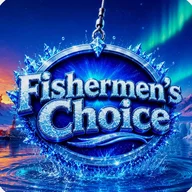
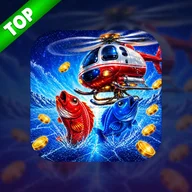
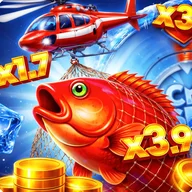
The app's visual identity is built entirely around frozen landscapes — blue skies, cracked ice surfaces, icicle-decorated lettering, and a consistent winter palette of deep and light blues with white. That same frozen world carries over into an included ice fishing mini-game, where a red-orange fish bursts through ice in splash animations, a red-and-white helicopter drifts across an icy horizon, and scores flash in orange and yellow on the results screen. It's a tonal match for the tracker itself: same season, different sport, same sense of cold clarity.
The calendar grid and activity charts rely heavily on color alone to distinguish active from inactive days — users who depend on screen readers or who have color vision differences may find these sections harder to navigate without additional pattern or texture cues.
Core App Features
App Type
Figure skating training and session tracking app with built-in ice fishing mini-game
Navigation Structure
5-tab bottom navigation: Home, Statistics, Goals, Records, Settings
Session Log Fields
Date, sport type, duration (minutes), intensity, surface type, rink or arena name
Surface Type Filters
All, Indoor, Outdoor, Synthetic, Rental
Statistics Metrics
Sessions count, minutes on ice, elements tracked, overall success rate
Statistics Views
Monthly calendar grid, activity by day bar chart, last 35 days bar chart, top elements success rates, month-over-month comparison
Goal Tracking
Goals with deadlines and target skating elements (e.g., Triple Axel, Quadruple)
Session Timer
Built-in timer with Start, Reset, and Apply to Duration controls
| App Type | Figure skating training and session tracking app with built-in ice fishing mini-game |
| Navigation Structure | 5-tab bottom navigation: Home, Statistics, Goals, Records, Settings |
| Session Log Fields | Date, sport type, duration (minutes), intensity, surface type, rink or arena name |
| Surface Type Filters | All, Indoor, Outdoor, Synthetic, Rental |
| Statistics Metrics | Sessions count, minutes on ice, elements tracked, overall success rate |
| Statistics Views | Monthly calendar grid, activity by day bar chart, last 35 days bar chart, top elements success rates, month-over-month comparison |
| Goal Tracking | Goals with deadlines and target skating elements (e.g., Triple Axel, Quadruple) |
| Session Timer | Built-in timer with Start, Reset, and Apply to Duration controls |
FrostTrack Common Questions
What information can I log when creating a new skating session?
When logging a new session, you can record the date, sport type, duration in minutes, and intensity level. You can also specify the surface type and rink or arena name, and use a built-in timer to track your time on ice and apply it directly to the session duration.
Can I filter my statistics by the type of skating surface?
Yes, the Statistics screen includes filter tabs that let you view your data by surface type: All, Indoor, Outdoor, Synthetic, or Rental. This makes it easy to compare your performance across different skating environments.
How does the month-over-month comparison work in the statistics section?
The app automatically compares your current month's performance to the previous month, showing key metrics such as number of sessions, total minutes on ice, and overall success rate side by side. It also includes a calendar grid and a bar chart titled 'Activity by day' to visualize your training patterns.
How can I track my progress on specific figure skating elements like jumps and spins?
The detailed statistics view features a 'Top elements' section that displays success rates for individual skating elements, such as Axel and Biellmann Spin. This allows you to identify which skills need more practice and monitor improvement over time.
What is the ice fishing mini-game included in FrostTrack?
FrostTrack includes an Ice Fishing mini-game as an additional feature within the app. It is a separate gameplay experience with its own score display and in-game mechanics, distinct from the core skating tracking and goals functionality.
Reviews (2)
View allLog in to write a review
Log in with Telegram
Llevo un par de semanas usando FrostTrack para registrar mis sesiones de patinaje sobre hielo y la verdad es que me ha gustado bastante 🥰. Mi hija mayor empezó con el patinaje artístico este invierno y yo quería llevar un control de sus entrenamientos sin complicarme la vida. La app …
3 replies
¡Ay, qué bonito leer esto! Yo llevo más tiempo con FrostTrack y tengo que decir que me parece una app con una PERSONALIDAD preciosa... ese ambiente de invierno, los cristales de hielo en los títulos, todo tan cuidado visualmente que da gusto abrirla aunque no tengas sesión ese día 🌨️💙. Lo de las estadísticas me parece lo más valioso de todo, la verdad. Ver el progreso mes a mes, comparar abril con marzo, saber cuántos minutos llevo en el hielo... es como tener un diario de entrenamiento pero sin tener que escribir nada a mano. Para mí que llevo años con el patinaje artístico, poder hacer seguimiento del Axel o del Biellmann Spin con porcentajes de éxito es una maravilla que no había visto en ninguna otra app parecida. Eso sí, coincido contigo en que el minijuego de pesca en el hielo me descoloca un poco... no le encuentro la conexión con el patinaje, aunque entiendo que quizás es para hacer la app más entretenida en momentos de descanso. En fin, para mí es una de esas apps que te alegra el día solo con abrirla ✨. Un abrazo enorme a todos los patinadores y familias que estéis por aquí.
App de registro de sesiones de patinaje. Funciona. El panel de estadísticas es lo más útil - sesiones por semana - minutos en el hielo - tasa de éxito por elementos. Los filtros por tipo de superficie también están bien pensados. El minijuego no aporta nada al propósito principal - sobra. Los botones pequeños son un problema real - no solo a ti te pasa.
La verdad es que coincido bastante con lo que dices de las estadísticas, Marisol_GDL. Lo que más me ha costado valorar es si la app justifica el espacio que ocupa y el tiempo de aprendizaje. Después de usarla unas 3 semanas (con sesiones de entre 60 y 90 minutos cada vez), la sección de comparativa mes a mes me parece genuinamente útil, no solo decorativa. Ver que en abril llevas 150 minutos frente a 0 en marzo te da una referencia concreta de tu progreso (que es lo que uno busca, al final). Lo del minijuego de pesca es un añadido que no suma ni resta para quien quiere seguimiento serio, simplemente lo ignoro. Lo que sí me preocupa un poco es si la app se mantiene útil a largo plazo o si pasados 2 o 3 meses los datos acumulados se vuelven difíciles de manejar. Por ahora, para el objetivo de trackear sesiones de patinaje artístico, hace lo que promete.
Bueno, acabo de descargar la app y todavía estoy explorando. Pues tengo una duda, porque en la pantalla de nueva sesión dice que puedes elegir el tipo de deporte, hay mas opciones ademas de patinaje artistico? Y lo de los elementos como el Axel o el Biellmann Spin, eso lo añades tu manualmente o ya vienen predefinidos? Porque si vienen predefinidos seria genial para alguien como yo que empieza y no sabe exactamente que nombres tienen los movimientos.
Sí, exacto 😊. Yo la uso principalmente para mi hija y eso de los porcentajes de éxito por elemento le motiva un montón, porque puede ver cómo mejora semana a semana de forma muy visual. Lo de la comparativa mensual también nos ayuda mucho en casa para saber si estamos siendo constantes o si hubo una semana floja. Un saludo.
Marisol_GDL: Lo del minijuego de pesca es un añadido que no suma ni resta para quien quiere seguimiento serio, simplemente lo ignoro.
El minijuego no molesta si uno lo ignora - de acuerdo. Pero ocupa espacio en la interfaz y genera confusión en quienes buscan una herramienta de seguimiento seria. No es un defecto menor - es una decisión de diseño cuestionable.