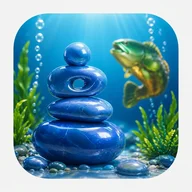
Silent Stone frames every meditation session around a single focused thought. When a session ends, that thought doesn't disappear into a log — it becomes a 3D stone sculpture, shaped procedurally by the direction and quality of what occupied your mind. No two stones are identical. Each one carries its own stage, complexity rating, and depth value, forming a record that is visual rather than numerical. Over time, these objects accumulate into what the app calls a stone archive: a personal collection that traces the texture of your inner life.
What the app tracks — and how
- The Stats screen surfaces session count, thought count, and total minutes over the last seven days
- A section called "Texture of thoughts" maps emotional qualities — calm, tension, clarity, fatigue, inspiration — across horizontal bars
- The stone interaction screen shows live metrics including stage, complexity, and depth, and invites you to rotate the stone with a finger gesture
- Recent sessions on the Home screen are listed chronologically, showing session type, duration, and time elapsed
Design and accessibility
The visual language leans heavily on bright cyan blue, golden yellow, warm orange, and translucent stone forms against an underwater backdrop. That palette is striking, but it creates real friction in places: yellow text on a bright blue background risks failing contrast thresholds, and the emotion-tracking charts use red and green coding without patterns or text labels as fallback. Color-blind users lose meaningful information here. The stone rotation gesture also requires precise fine motor control, with no documented alternative input method. These aren't fatal flaws, but they are genuine gaps for users who rely on accessibility features.
Structure and navigation
- Five-tab bottom navigation: Home, Stone, Journal, Stats, More
- The More menu organizes features into Practice, Your Record, and Preferences sections
- Session types include Breathing, Guided, and Silence — each with distinct icons paired with text labels
- Metrics are grouped by time period and category, not scattered across screens
An underwater world, rendered still
The app's aquatic setting — translucent stones stacked in cairn formation, streams of bubbles rising through blue water, seaweed swaying at the edges of each screen — shares its atmosphere with other underwater worlds that use stillness as spectacle. The same bright blue, the same sense of depth, the same quiet suspension that gives certain visually rich environments their pull: in Silent Stone, it serves contemplation rather than action, making the underwater frame feel less like decoration and more like habitat.
Silent Stone is doing something structurally uncommon in the meditation space — using procedural generation not for gameplay variety, but as a mirror. What you think shapes what you see. Whether that idea lands depends entirely on how much you want your inner state to have a physical form.